Triton TS Ltd

Hosting | Design | Technical Solutions

  • Cart
  • Checkout
  • Contact
  • Featured Organisations
    • Ashe Farm
    • Defra Stoves
    • Wilderness Solutions
  • Featured Services
    • Courses & Events Management
  • Featured Slider
  • Home
  • Modern Web Sites
  • My Account
  • Network Solutions
  • Remote Access Support
  • Shop
  • Support
  • The Team
    • David Burton
    • Lindsay Birch
    • Neil White
  • Useful Tips
  • UKFast
  • Web Site Build & Payment

Thunderbird

You are here:Triton TS Ltd > Useful Tips > Email > Thunderbird

Remove the signature separator from Thunderbird

Neil White 28th May 20193rd June 2022 Email, Thunderbird

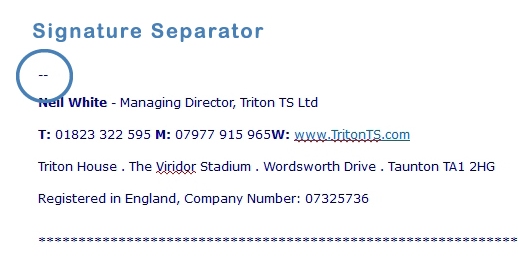
If you add a signature to your email client in Thunderbird, the information is automatically separated from the main text via a couple of dashed lines.

To remove this open the config editor.

Tools -> Options

or Edit -> Preferences

and then

Advanced -> Config Editor
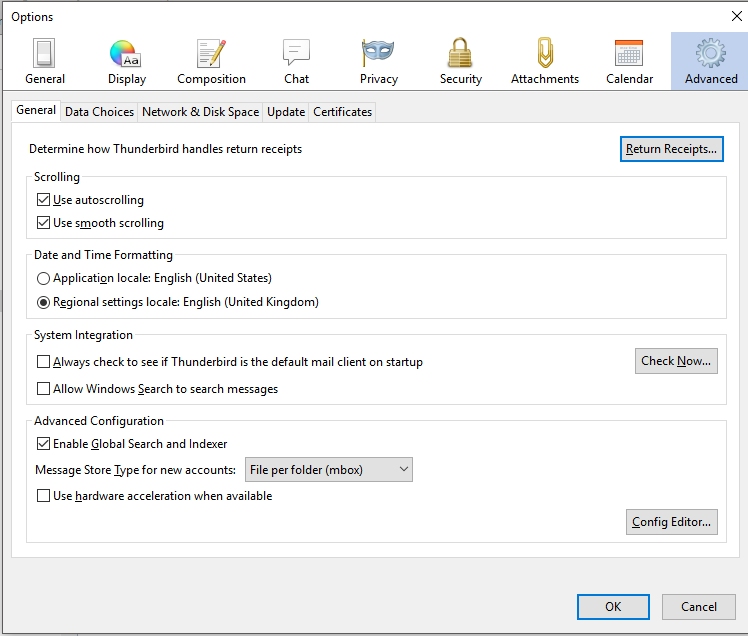
Then search for

mail.identity.default.suppress_signature_separator

and set it to TRUE by double-clicking it.

Categories

  • Email
  • Featured
  • Images
  • Media
  • MySQL
  • Security
  • Server Issues
  • Thunderbird
  • Useful Plugins
  • Wordpress

Recent Posts

  • Plesk pre-migration error
  • WordPress: Page Editor Upgrade
  • WordPress: Clone Posts & Pages
  • Google reCAPTCHA
  • Post Type Switcher

Article Features

Back Up Communication Databases Email Football Manager 2020 Images Keeping Things Simple Linux Server Media MySQL Online tools reCaptcha Securiity Spam Prevention Thunderbird useful plugins Web Forms Wordpress Wordpress Page Editing

Address

Triton House

43 Merton Road

Rumwell

Taunton TA4 1FE

Contact Us

  • Mobile: 07977 915 965
  • Phone: 01823 322595
  • Email: admin@tritonts.com
Copyright © 2026 Triton TS Ltd Theme by: ThemeGrill Powered by: WordPress